Level up your business security with free, on-demand training and certification. Explore 1Password Academy today →
passkeys
290 Topics
Passkey no longer working on Boursobank
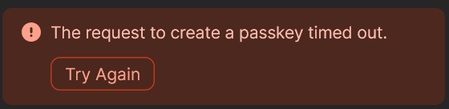
Hello, I uses passkey since 2023 on Boursobank without any issues. Since a few days, I have a error that is displayed immediately (no loading or timeout) telling me that it timed out, the website switch directly to a normal login. So I guessed there was an issue on the key itself. I tried to revoke and create a new one, but same issue. When trying to create a new passkey, 1Password display the error "The request to create a passkey timed out". The error is also immediate (no loading or anything). On the website, it displays "Enrolment has expired or been cancelled". I've tried using other passkeys I have, without any issue. It seems to only impact Boursobank. Using Firefox 138.0 + Extension on Windows 11 24H2Solved2.4KViews4likes75Comments
Passkey unlocked using device passcode
Hi, A silly question, maybe, regarding unlocking 1Password with a passkey. I was one of the private beta users and, while I found it very convenient, there is an aspect that worries me a lot. Probably it’s just me not understanding the details, that’s why I am asking here. In the blog post describing the introduction of passkeys to unlock 1Password (https://blog.1password.com/unlock-1password-individual-passkey-beta/) you can read: “Once you’ve created a passkey, you can unlock 1Password by using biometrics or, as a fallback, the passcode that protects your device. You can then use your first device to set up more trusted devices with 1Password.” Let’s imagine that someone has access to my iPhone and tries to get into 1Password. Biometric will not work, as his face is different from mine. With the current master password, he needs to guess a long and complex sequence of letters, numbers and special characters. Very difficult. With the passkey, he will only need to guess the passcode that protects my device. Much easier than my master password. Entropy level of the secret key of the passkey pair can be as high as possible, but if anyone can access it with the phone passcode (usually 6 digits, nobody will ever use a 26 characters random password as a phone passcode), can someone explain me how the passkey is as safe as the master password in a situation like the above? Thanks! 1Password Version: Not Provided Extension Version: Not Provided OS Version: Not Provided Browser: Not Provided2.4KViews3likes19Comments
1Password is not respected as the default passkey manager on Android
Google Pixel 8 Pro Android 16 1Password for Android 8.11.6 Today, I decided it was the day to setup Passkeys across the supported website/services. Started 1Password for Android - > Watchtower and selected uber.com. Went to the suggested URL after tapping "Use Passkey". URL went to https://account.uber.com/passkeys. Logged in. Was presented the Passkeys page for Uber. Tapped + Create a passkey. Tapped Create a passkey at the popup dialog. Bam! Google Password Manager pops up asking if I would like to create a passkey to sign in to account.uber.com. Cancelled. I remembered doing this already so I went to the following places to check settings. Chrome -> ... -> Settings -> Google Password Manager -> Settings. Checked the following; Offer to save passwords (disabled), Automatically create a passkey to sign in faster (disabled), Auto sign-in (disabled). Chrome -> ... -> Settings -> Autofill Services. Checked Autofill using another service (Enabled). Tapped Android Settings and this is the 3rd place I check next. Alternatively, I can get to it by navigating as per point 3. Android Home Screen -> Settings -> Passwords, passkeys and accounts -> 1Password (Preferred service) - Enabled. Additional services: Microsoft Authenticator (disabled), Google (disabled). Can you put in checks in place please so this doesn't happen? If Google is doing something naughty, can you please work with them to resolve this? Please? Besides this, my experience on Android has been a mixed bag. Some login prompts, 1Password will have no issues popping up offering to autofill. But the MAJORITY of apps and websites, 1Password Autofill simply doesn't do enough. I have to jump back and forth to copy and paste passwords. Please let me know how I can help you folks resolve this.Solved2KViews3likes13Comments
Why are passkeys so great?
I don’t get it. Passkeys don’t make the existence of user/passwords obsolete. Companies still have to save and protect my password. Hackers can still use my user/password to login. Companies don’t require passkeys….but they do require passwords. Passwords are not going away, right? (although the way people talk about passkeys, they act like they are). Why is it so painful for people to enter their username and password when they have tools like 1Password that make it so easy to autofill and manage “Fantastic” 20-30 character complex generated passwords that are unique for every web site you visit so no password is reused? (not to mention the excellent one-time password integration by 1Password that more and more sites are also automatically pulling the codes out of 1P and populating them when configured as the authenticator app) Why do I need a passkey if I am perfectly happy and secure with these 1Password’s autofill capabilities? Tonight, I signed into a site using a passkey and I still had to get a code from my phone since 2FA was enabled. So, passkeys didn’t save me the 2FA step. So why bother? Is it because of man-in-the-middle attack and the password is more easily captured and used as opposed to a passkey? I thought that would be mostly mitigated via https encryption over the wire. My point is that someone can still login with the user/password…so u/p does not go away. Can someone please make the case for me to abandon my 1Password password autofill and use passkeys instead?Solved2KViews0likes3Comments
Unable to create and save a passkey in Costco android app
I am getting the error message when trying to create a passkey in the Costco android app on my Samsung S22 Ultra phone: "Unable to save passkey. For security reasons, 1Password did not save this passkey. The associated URL for this passkey does not match the selected app."Solved1.5KViews7likes19Comments
Use of PRF extension
Hi, I've tried out the beta to unlock 1Password with a passkey, and it seems to work well, but I'm surprised that passkeys only serve the purpose of authentication. According to the white paper, the actual encryption key is stored on the already logged in clients, wrapped by a key provided by the server when the authentication succeeds. This is different from the way Bitwarden has released its passkey unlock beta. The encryption key is directly derived from the passkey using the FIDO2 PRF extension. This allows the use of security keys as passkeys. I know that 1Password does support physical tokens as passkeys too, but it is not of much use, since you need a trusted device to transfer the encryption key anyway, which means you can not rely on your key as a backup method. The absence of PRF also means that users can not take advantage of the passkey backup offered by Google Password Manager and iCloud Keychain. I think that the ability to set up PRF with supported authenticators would be a great addition to the system. It would allow a much more consistent experience and would probably prevent some account losses due to the recovery code not being saved (or access to the associated email being lost, e.g. because it was stored within 1Password). I know that not all platforms currently support PRF, but it is already quite widespread, as from what I have tried, at least Android, Chromium and YubiKeys do support it. Even users of unsupported browsers would benefit this feature since they could temporarily use a supported platform to regain access when needed. By the way, based on my test with Bitwarden, 1Password as an authenticator (for third-party websites) doesn't seem to support PRF. This would be a great addition too, because it's the most practical way to use zero-knowledge encryption with passkey login, so we can probably expect more and more websites to implement it. Thanks a lot for your work! Guillaume 1Password Version: Not Provided Extension Version: Not Provided OS Version: Not Provided Browser: Not Provided1.4KViews2likes4Comments
Why passkey login to 1Password?
I can't understand the reason to spend development dollars to enable passkey login to 1Password account. I must be missing something here. I am a huge fan of passkeys and 1Password as the repository for all my passkeys, but logging into 1Password with a passkey makes no sense to me. My assumption is that to login to 1Password with a passkey, that passkey has to be stored on a device. For iOS/Mac that is iCloud keychain. For Windows, Linux, Android, or any other platform it will be stored somewhere else. Now the passkey, which is the gateway to my digital life, is stored in a whole bunch of places, with associated security or lack there of. If this assumption is correct, then 1Password seems to be passing off the security of the whole platform to other platforms which means it is out of their control, and inherently less secure. (iPhone passcode could give access to iCloud Keychain for example). One other question, if I loose all my devices, how do I get access to my 1Password account? No passkey or other logged in device available to validate. I go to 1password.com and ??? Help me understand why passkey login to 1Password is a benefit worth doing and using? Thanks! 1Password Version: Not Provided Extension Version: Not Provided OS Version: Not Provided Browser: Not Provided1.3KViews2likes17Comments
Recovery Code: Recent attempt was cancelled.
I have created a new test account and wanted to try out the recovery code. Unfortunately, I receive an error message stating "Recent attempt was cancelled" every time I attempt to log in, even after waiting several hours and generating new codes. 1Password Version: Not Provided Extension Version: Not Provided OS Version: Not Provided Browser: Not Provided1.3KViews1like9Comments
Issues with macOS 26 Tahoe and Passkeys
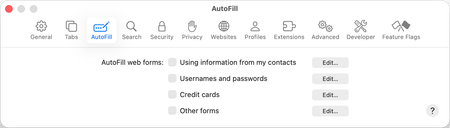
Dear all I have two issues with passkeys and macOS Tahoe: When I attempt to save a new passkey in Safari, macOS default handling of Passkeys butts in, despite having disabled all Autofill options in Safari settings. Ultimately, creating a passkey fails. My workaround is to use 1Password on iOS (26.0.1) to create the passkey. This works fine and the passkey is also synced to 1Password on my Mac. This brings me to issue number two. When attempting to sign in with a passkey, once again, macOS defaults to the following prompt: When I select scan QR code and scan the code with my iPhone I get the prompt to use 1Password on iOS to sign in: The sign in then works fine using 1Password. With previously created passkey, I get the correct signup popup in the browser from the 1Password extension: Also, to confirm, these are my system settings for AutoFill & Passwords: Anyone else experiencing similiar issues with 1Password on macOS Tahoe? Or did I miss something and have some settings misconfigured? Thanks Kenneth1.2KViews0likes3Comments