Our community is getting an upgrade on July 2nd! Learn more in the FAQs →
Forum Discussion

jheredia
6 months agoNew Contributor
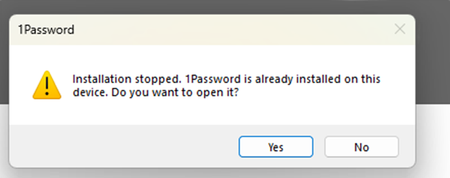
"Installation stopped. 1Password is already installed on this device" Notification
Good morning, Multiple users, including myself, are receiving this error: After clicking, "Yes" the pop-up will come back sometime later. We are deploying 1Password via Intune (Windows Store A...
- 6 months ago
Hello jheredia and marctheshark6! 👋
Thanks for reaching out. Earlier this year, we deprecated the EXE installer for 1Password for Windows and replaced it with the MSIX installer, which was communicated in emails to 1Password admins. You can read more about this change here: About the 1Password MSIX installer
As of November 11th, all existing EXE installations were automatically migrated to the MSIX version during an update.
If you previously deployed the EXE installer, not the MSI installer, then what you’re seeing is likely caused by your deployment tool (Intune) still targeting the old EXE package identifier. Because the EXE installer doesn’t recognize the MSIX version as installed, it continues trying to deploy it on each restart, which triggers the notification you’re seeing. To resolve this, remove the old deployment that uses the EXE identifier, then redeploy 1Password using the new MSIX package. Once the deployment is updated, the notifications should stop.
If you have any questions, or require any assistance with specific steps in this process, please send an email to support@1Password.com along with a link to this thread and our support team will be happy to help.
-Dave


sbestv
5 months agoNew Contributor
Similar experience. Intune/Store used to deploy. Same message as OP, but not all systems. Mine was initially manually installed, so it seemed reasonable to have the "error" given the explanations here and elsewhere. Removed app (manually, which might be a clue), ultimately even did some registry cleanup. Deployment successful, next day after install... message returned.
Log shows ref to "Installer=MSIX", intune shows install per user not device. Updates are working.
If this is related to breadcrumbs from prior installs, what is our best approach? Uninstall via intune? Redeploy? To deploy again makes me wonder if even more will see this message.
Should add: no impact to function, just an annoying message.
- 1P_Gem4 months ago
Moderator
Hi sbestv, apologies for the delay in response here!
If you're still running into this issue, I'd like to ask you to email in a 1Password diagnostics report, so our team can investigate further:
Send a diagnostics report (Windows)
Attach the diagnostics to an email message addressed to support@1password.com
With your email please include:- A link to this thread: https://www.1password.community/discussions/1password-work/installation-stopped-1password-is-already-installed-on-this-device-notification/164874/replies/166464
- Your forum username: sbestv
You'll receive a reply from our BitBot assistant with a Support ID number. Please post that number here. Thanks!


