Level up your business security with free, on-demand training and certification. Explore 1Password Academy today →
Forum Discussion

mr_onepwone
5 months agoNew Contributor
1password.exe never closes
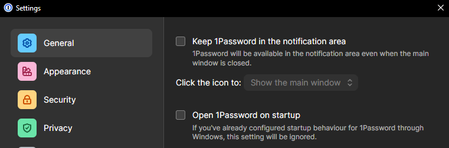
Hi there, I've set my windows installation of 1Password to this: But when I close 1Password after opening it once, these remain in the task manager: What is going on here?

1P_Gem Moderator
5 months agoModeratorHi mr_onepwone!
Just to make sure I'm following correctly, how are you closing 1Password when this happens? For example, are you clicking the X in the top corner, choosing Close or Quit from the ⋮ menu, or using a keyboard shortcut?
If you're using the X in the corner or the Close option, what you're seeing is the expected behaviour for your current settings. 1Password will stay running in the background, but won't appear as an icon in the system tray. To fully quit the app, you can use ⋮ > Quit or press "Ctrl + Q" with the window open and focused.
Let me know if this helps, or if you're seeing something different!


