Protect what matters – even after you're gone. Make a plan for your digital legacy today.
Forum Discussion

jay97
3 months agoNew Contributor
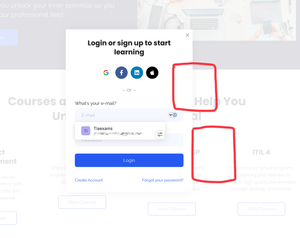
Login Options Prompt covers website / OS info
Hello all, I am writing to suggest a possible feature request / tweak. I currently use 1password on Mac, iphone, and windows 11 and all of them work really well to bounce between multiple apps at a...

1P_Dave Moderator
3 months agoModeratorThank you for the feedback! There isn't currently a way to change where suggestions appear, by design the suggestions menu and icon appear for the field that 1Password is offering suggestions for so that you know where your data will be filled if you click on the menu.
That being said, I'll pass your comments along to the team internally.
Sometimes when clicking the 1password icon inside of a password entry box, it covers other information that auto populates base on the OS or website. For example, apple will attempt to auto populate authentication numbers (txt sms) or some sites reveal certain information as a drop down graphic after clicking inside of the box but 1password can sometimes cover up this information.
You should be able to press the esc key on your keyboard to dismiss the suggestion from 1Password. Does that option not work in your case? I look forward to hearing from you.
-Dave
PB-51001880





