Our community is getting an upgrade on July 2nd! Learn more in the FAQs →
ios
3303 Topics
#ME-271 feedback: Inline menu hidden in Safari on iOS when system AutoFill is enabled
Hello, I recently noticed that a lot of login forms were no longer showing the 1Password drop-down to select a credential. I believe it is related to this change referenced in the title. Simply put, I prefer the browser extension to select credentials for logging in. It handles OTP codes faster and easier than the system autofill in iOS/iPadOS. Instead, using the system autofill requires extra taps, needlessly populates the clipboard with OTP codes, and generates notifications about the OTP being copied to the clipboard that I'm frequently needing to dismiss. I'm not sure if this is something that can be made optional in the browser extension settings, but I strongly dislike this new behavior and hope that it will be reverted to the previous behavior, or at least made optional. Thank you.Solved3KViews8likes72Comments
Apple's Agentic Password Repair
There's nothing in Apple Passwords that will make me switch to it, BUT, when this recently announced https://www.theregister.com/personal-tech/2026/06/09/apples-ios-27-goes-all-agentic-on-compromised-passwords/5252957happens in iOS/MacOS27 I might do it with items I have in Passwords, then export the fixed data items into my vault. I wonder if there are any plans to implement something similar in 1Password?Solved51Views0likes1Comment
Feature request: Default correct account for site when multiple exist
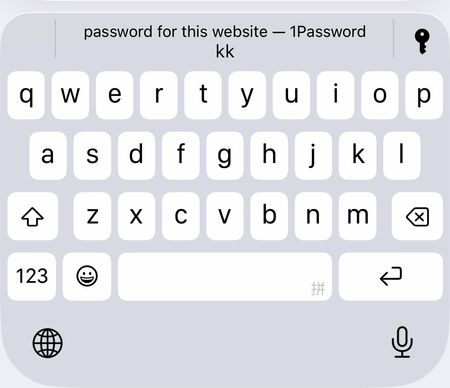
With a family account using sharing, there are many cases where multiple accounts exist for one site. It would be nice if 1Password was smart enough to recommend the account tied to the user who is signed into 1Password as the default one to use when you go to the site. In other words, if I go to a site, I want to see my account show up as the account to use for autofill and if my wife goes a a site, she should see hers. Right now, she always sees mine as the recommended account to use and she has to do extra work to pick hers. This primarily happens on iOS where there is a single option shown and a key to the right that lets you get more options to select from.127Views0likes7Comments
On iOS/Safari how do I stop 1Password suggesting to save passwords filled out by 1Password
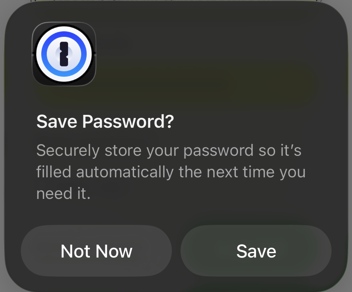
This is starting to drive me nuts. In the last couple days or so, whenever I use the login autofill function in Safari, the one above the keyboard, I get a popup asking to save the password in 1Password. That is, the login I have just filled out using 1Password, I am being asked to save in 1Password. This dialog: No setting I can find gets rid of the popup. I have tried disabling the 1Password Safari extension but this doesn't seem to be involved at all. I have looked through the 1Password app but can't find any option that gets rid of it. I have also tried disabling the "suggest strong passwords" features in iOS settings, but it doesn't get rid of it either. Only times I don't get the popup is when the 1Password Safari extension decides to work, which is perhaps about half the time, and actually shows the little 1Password icon in the login fields, allowing me to select the login. If I manually open the 1Password Safari extension and select autofill, I get another dialog asking to update the password instead, despite the fact the password and login URL are already present and recognized by 1Password, at least so far as the autofill is concerned. This is on iOS 26.4 using Safari. 1Password app version is 8.12.10.Solved609Views5likes22Comments
Unlock with Device not working - iOS
Is anyone else having issues getting 1Password on iOS to consistently unlock with Device? I have the option turned on, I have FaceID and all the relevant iOS security settings switched on but it works so inconsistently I am not sure what's going on. On macOS it works fairly flawlessly (with the odd hiccup here and there) but on iOS it is absolutely terrible and I am not sure why. Anyone else got this problem?102Views0likes7Comments
Merging Duplicates
I know that the general response is to manually do this, but doing this with 1000+ objects is impractical to say the least. Some were created because when I migrated to 1Password, some duplicate/corrupt entries already existed in my profiles on Avast, Google, etc, which I did not notice at the time. Unfortunately, some have been created since then by either less tech-savvy family members on their own accounts or how 1Password is asking more often regarding site/app trust & permissions ("Allow fill once") and is thus creating duplicates of its own accord. The fact that merging wasn't already added a while back, considering how many people have asked about it over the years, is interesting to say the least. And yes, I have been attempting to create my own tool for quite some time, but it is difficult to find time to work on it lately, on top of not being successful in general.189Views1like7Comments
1Password launches app instead of website even with website URL
Hopefully maybe someone can help. Support was unable to help with this issue. About a few months ago, after a 1Password update, 1Password randomly started launching my banking app whenever I clicked the URL on the login item page. This was not a new login item and the URL was auto filled in by 1Password when I initially created the login item. I've had this login item for years and the last edit was even year ago (until trying to troubleshoot this issue). It worked perfectly with absolutely no issue for years. Whenever I clicked the login item, it opened my banking website in the in-app browser that used to be included in 1Password. I have multiple accounts with this bank. I use the app only for my personal account and have it set to open with Face ID. For every other account, I used to use 1Password specifically because it opened it in a browser and I was able to keep the accounts separate that way. The problem now is that no matter what account login, if I try to use in 1Password, it automatically launches the banking app and before I can even do anything, it auto logins with my face into the personal account. Literally the only way I can use the app with another account is to go in and turn off FaceID. Even then 1Password does not auto fill the password, I have to manually copy and paste so I genuinely don't know why it keeps launching the app. But I don't want to do that. I just want 1Password to keep opening the other logins in the browser like it used it. I don't understand why this is happening and support seems lost as well. I've tried changing the URL (per support) 4 different times. No dice. I've tried going to Safari myself, going to my bank's website, but if I try to use 1Password to fill in the login, even in Safari, it kicks me off Safari and 1Password launches the app. And I know it's 1Password because to test it I saved my banking password to one account in Apple Passwords and if I try to fill in the password on the website using the built-in Apple Passwords app, it just logs me into the website with no issue. I've even reached out to my banking app and it's nothing on their end either. I am begging. Please. If anyone has any idea on how to fix this issue, it would be very very much appreciated.98Views0likes3Comments[bug] iOS safari freeze with filling suggestions
When I tap the suggested username above the keyboard and confirm Face ID, the entire page freezes. Safari becomes unresponsive, and I have to force close the app. If I click the password icon, select 1password, then select the username, everything works fine. 1Password version is 8,12.21, iOS version is 26.557Views0likes5CommentsiOS apps keep forgetting current collection
I use a single collection 90% of the time and the other 10% of logins etc are stored in 2 other collections for occasional use. I also set a collection for the context that i'm currently in, so use a work collection when at work etc. With this setup I leave the app open to the collection I use most of the time without getting logins popup all the time from other collections that I hardly ever use and aren't relevant. In one of the more recent updates something has changed so that every time I open the app the view that's displayed is my top level account, so all items, from all collections are visible all the time. How can I select a collection as default so that I only see items from this collection rather than from every login from every collection? Thanks158Views3likes5Comments