Our community is getting an upgrade on July 2nd! Learn more in the FAQs →
android
1284 Topics1P fingerprint log in didn't work with unlock Android with face
Hello team, I started 1P trial yesterday on my Intel Mac and Android. The features are much more than expected and everything looks great except 1P fingerprint log in on Android. From my observations through several attempts, it looks like 1P fingerprint won't work when Android has been unlocked with face. Expected: 1P fingerprint log in works regardless Android unlock methods Observed: 1P fingerprint works only when Android has been unlocked with fingerprint Unlock Android with fingerprint → OK: 1P fingerprint Unlock Android with fingerprint (Login 1P with password; for the first time only) Lock 1P → Login 1P with fingerprint → Success Close all apps → Login 1P with fingerprint → Success 1P fingerprint login continues working as far as I unlock Android only with fingerprint Unlock Android with face→ FAIL: 1P fingerprint Unlock Android with face Login 1P with fingerprint → "That didn't work. Please try again." (after 1-2 sec) Click "Fingerprint icon" (right-side) → Only screen flashes Forced login 1P with password Lock 1P → Password only (no more fingerprint icon) Close all apps → Open 1P → Password only It's interesting that I can still recover 1P fingerprint by unlocking Android with fingerprint, then start 1P (i.e. restarting from the beginning of OK above). Ref. 1P Security Settings Unlock biometrics/device passcode/device: All ON Require account password: Never Lock when device locks: OFF Auto-lock on exit: Never For the reference, my symptom is similar to the one reported for Xiaomi in the other thread and I tried the Recommendation by 1P_Timothy twice but the issue still persists. My phone is running Android 16 on Sharp AQUOS R8 Pro (model: SH-R80P) and I'm happy to send diagnostics upon a request. Thanks, Shin8Views0likes0Comments
3 hours to find the solution to install on new phone!
Yes, I have 1 password on my computer and an old Android phone. I knew all of the info asked for: email, security key, password ... but no matter how I tried to set it up on the new phone, whether by scanning a QR code or entering the details manually, I kept getting the message "no passkeys found". I had no idea what it was looking for. Finally I went to Gemini to ask how to proceed. There I was told to go to my web account and remove all passkeys and 2-factor login info. After I did that I was finally able to install and use 1password on my new phone. However, there was no help or instructions on the help menu and I did not remember setting up Windows Hello passkey. So buyer beware! I'm now thinking of moving to a new password manager.25Views0likes2Comments
Credentials not saving when using 1Password in Google Chrome on Android
I am experiencing an issue with the 1Password Android app (version 8.12.21) while using Google Chrome (version 148.0.7778.180)(OS: Android 15; 2312DRA50G Build/AQ3A.240912.001). When I log into a website and click "Save" when 1Password asks "Save username and password in 1Password?", nothing happens. There is no error message displayed, but the credentials are not saved to my 1Password vault either. I have already tried this on multiple different websites in Google Chrome, and the issue persists across all of them. I have also already run the Autofill Health Check within the 1Password app, and it doesn't show any issues or configuration errors.45Views0likes3Comments
Linked Apps
Hello! I wanna know how can i linked an app to an already saved login! For example: I have 1 saved site login and i wanna add to this saved login the option when i open the Android app to can fill it too :) 1Password Version: 8.4.1 Extension Version: Not Provided OS Version: Windows 11 / Android 1214KViews2likes39Comments
Android app not working
In a previous discussion for an android app to work with a site created on my computer the solution was to open the app, select a login field, and select "Open 1 Password." the options for a login field were Google, Apple and Microsoft. I selected Google but "Open 1 Password" prompt did not appear!.18Views0likes1CommentAuto-fill options are too dim to read
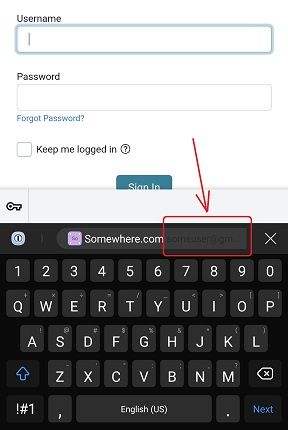
Using android on a Samsung Note10. When I have multiple accounts for a website and 1Password shows the accounts to choose from, the account name is so dim I can't read it on my phone. I tried both Chrome and Firefox, and tried turning off my DarkReader plugin, but it made no difference. I looked in all the options but there are no graphic options I can find to fix this. See screenshot. 1Password Version: Not Provided Extension Version: Not Provided OS Version: Not Provided Browser:_ Not Provided163Views1like8CommentsIf Android is offline: 1Password app misbehaves
I have the latest version of the 1Password app on my Samsung Galaxy S23. When the phone is online the app works as expected. But when the phone is offline (e.g. on a plane, or without coverage) then the app has misbehaved several times now: The app either shows a blank screen after opening, or only shows partial matches on search, or it is extremly slow to display data. I am aware that making changes when offline has limitations, but I just need to look up a password (read). I am worried that 1Password will fail me in a situation where I need a password urgently but my phone has no connectivity. Any insights are appreciated. Thanks45Views0likes4Comments
Merging Duplicates
I know that the general response is to manually do this, but doing this with 1000+ objects is impractical to say the least. Some were created because when I migrated to 1Password, some duplicate/corrupt entries already existed in my profiles on Avast, Google, etc, which I did not notice at the time. Unfortunately, some have been created since then by either less tech-savvy family members on their own accounts or how 1Password is asking more often regarding site/app trust & permissions ("Allow fill once") and is thus creating duplicates of its own accord. The fact that merging wasn't already added a while back, considering how many people have asked about it over the years, is interesting to say the least. And yes, I have been attempting to create my own tool for quite some time, but it is difficult to find time to work on it lately, on top of not being successful in general.188Views1like7Comments
Android Chrome Native passkey popup
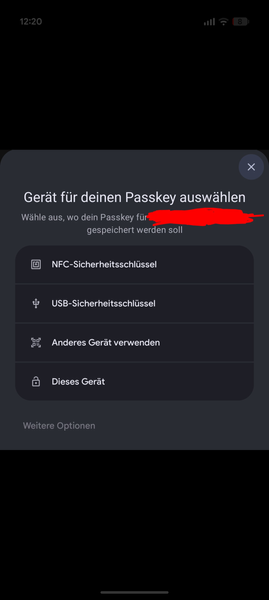
Hi, I'm using Google Pixel with mainly chrome browser. I noticed on some websites, that in some cases instead of 1password popup that OS popup appears when either logging in with passkey or when creating a passkey. I attached a screenshot of one example when creating a passkey. I can't share URL with you. For login I noticed that problem with German website "Computerbase". For normal password login the 1password autofill works most of time so I assume my 1pw settings are more or less good. Also passkeys work on many websites flawless. Hope you have any idea to cope with it :)54Views0likes1Comment
Unable to create and save a passkey in Costco android app
I am getting the error message when trying to create a passkey in the Costco android app on my Samsung S22 Ultra phone: "Unable to save passkey. For security reasons, 1Password did not save this passkey. The associated URL for this passkey does not match the selected app."Solved1.5KViews7likes19Comments